
Operating the E-14 2.0 with the Bosch Smart System
Switching on and the gear display
Section titled “Switching on and the gear display”Switch the Bosch Smart System on with the power button. The E-14 only works with the system on. Depending on the display, the gear shows on the home screen or flashes up briefly when you shift; choose the home screen with the Bosch remote.
Shifting
Section titled “Shifting”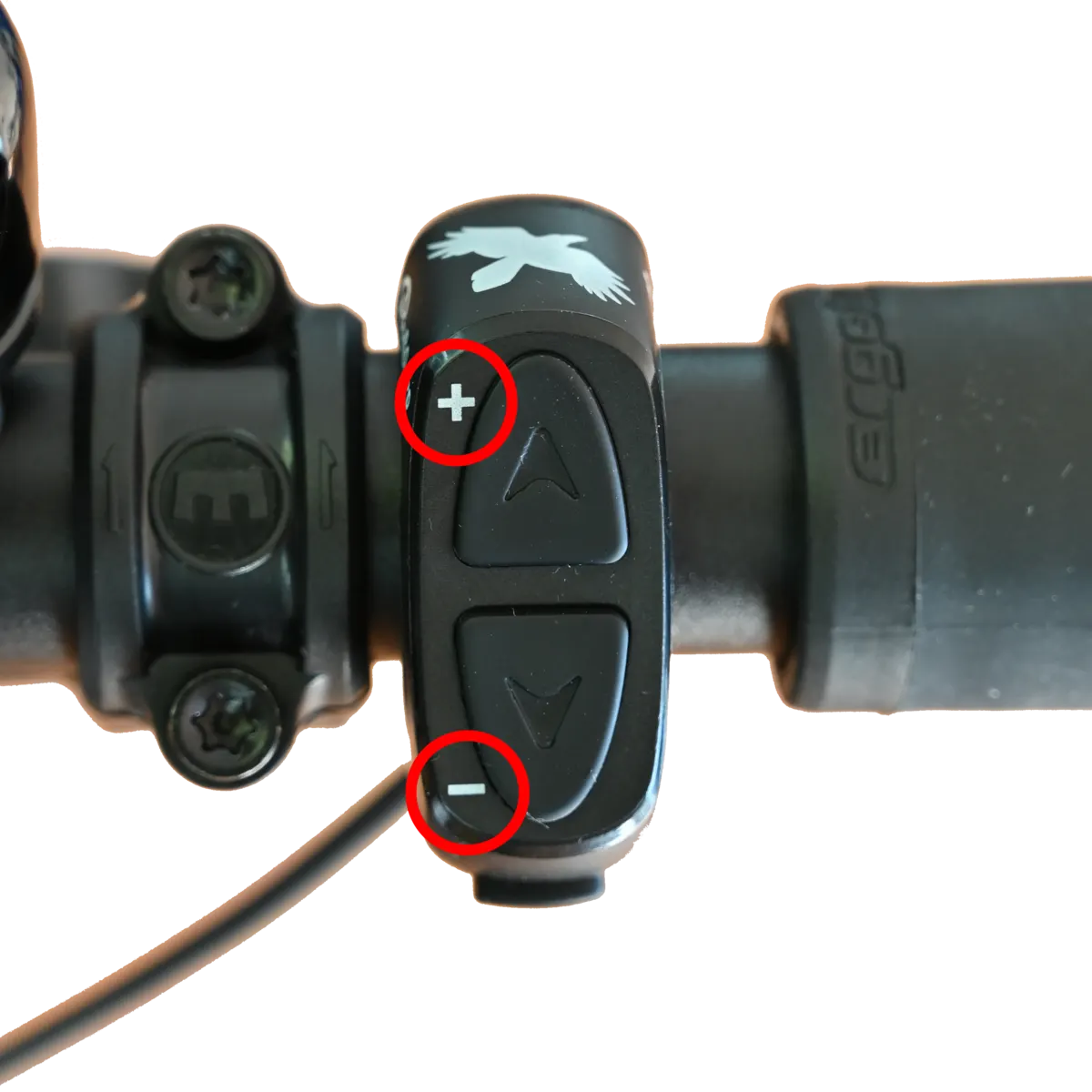
- + button: one gear up, towards 14;
- – button: one gear down, towards 1;
- M button: switches the automatic mode on and off (if installed).
On the Trigger, push the + lever with your thumb or pull it with your index finger, and push the – lever with your thumb. It shifts on the first click.
After a press, the system waits for the right crank position, backs the motor off, shifts and restores the assistance — in about 0.2 seconds. To keep it smooth:
- a cadence of 50–80 is ideal;
- do not push hard on the pedals while shifting;
- shift down in time, before a climb for instance.
Multishift
Section titled “Multishift”With Multishift enabled, holding + or – makes the E-14 shift one gear first, then in threes (1 + 3 + 3 + 3) with pauses of about half a second, all the way to gear 14 or gear 1. Turn Multishift on or off in the E-14 2.0 app: Shifting functions.
Automatic mode
Section titled “Automatic mode”With the Bosch Smart System, the E-14 2.0 also offers automatic shifting. It has been available as an update since 6 October 2025 (model year 2026): both the Bosch Flow app and the Rohloff E-14 2.0 app need updating. On S-Pedelecs it works only with the Bosch Gen5 (BDU38) motor, not with Gen4 (BDU37).
| Mode | What it does |
|---|---|
| M — manual | You shift: a short press makes the motor back off briefly and the gear change; hold for Multishift. You can also shift while coasting — after a descent or a stop, for example. |
| M+ — automatic when coasting | While you are not pedalling, the system matches the gear to your set cadence; as soon as you pedal, you shift by hand. Ideal for varied terrain. |
| A — automatic | eShift does all the shifting to your set cadence. You can step in by hand at any time; the automatic stays active. |
Changing mode: on the handlebar button (8801), briefly press both buttons together or press M; on the Trigger (8801-04), briefly press both levers together. On a drop bar, the TRP Hywire Brifter brake-shift lever also works with the E-14 — on it, briefly pressing both shift buttons together changes the mode.
Set your preferred cadence in the Bosch eBike Flow app or on the display: Shifting functions.
Starting gear (Auto-Downshift)
Section titled “Starting gear (Auto-Downshift)”With a starting gear set, the E-14 shifts back to it by itself below 5 km/h — but only if you were riding faster than 10 km/h before and your last gear was higher than the starting gear. Keep the load off the pedals for this. The starting gear can be set between 4 and 9 in the E-14 2.0 app; with none set, the function is off. Depending on the bike maker, it comes switched on or off from the factory.
Reversing the shift direction
Section titled “Reversing the shift direction”The + and – assignment can be swapped in the E-14 2.0 app: Shifting functions.
Cleaning
Section titled “Cleaning”Before cleaning, switch the system off and remove the battery.
- Clean connectors only when plugged together.
- The E-14’s parts are waterproof, so riding in rain is fine; protect them from heavy dirt.
- Use gentle cleaners, soft brushes or cloths — never solvents, pressure washers or steam cleaners, and never submerge anything.
- Refit the battery and switch on only when the contacts are completely dry.
Power and safety
Section titled “Power and safety”The E-14 runs on the e-bike battery, only with the system on. When the battery runs flat, motor assistance switches off automatically.
- Before any work, switch the system off and remove the battery.
- Do not open the E-14’s parts — it voids the warranty and can cause damage.
- Pushing the bike backwards with the system off can switch it on.
- Only disconnect or connect plugs with the system off — otherwise parts can behave unpredictably and be damaged beyond repair.
On using the SPEEDHUB: Riding and shifting.
Frequently asked questions
- How does the E-14's automatic mode work on the Bosch Smart System?
- There are three modes: M (manual), M+ (when coasting, the gear is matched to your set cadence automatically) and A (fully automatic, which you can override at any time). Switch between them by briefly pressing both handlebar buttons together or the M button, or both Trigger levers together. It has been available as an update since 6 October 2025.
- When does the E-14 shift back to the starting gear on the Bosch Smart System?
- When you slow below 5 km/h after riding faster than 10 km/h, and your last gear was higher than the set starting gear — provided there is no load on the pedals. The starting gear can be set between 4 and 9 in the E-14 2.0 app.